Redaction And Text Replacement
Hide credentials, mask sensitive regions, and replace visible text before export.
Fraime.it includes privacy tools for developer recordings where secrets, account IDs, emails, URLs, or customer data may appear on screen.
Run privacy review before you publish, even if you think the recording is clean. Developer tools can reveal tokens in logs, URLs, terminal output, headers, config files, dashboards, and environment panels.
Automatic credential detection
The privacy analyzer uses on-device OCR to scan for API keys, tokens, and similar credentials. Review detections in the privacy lane before exporting.
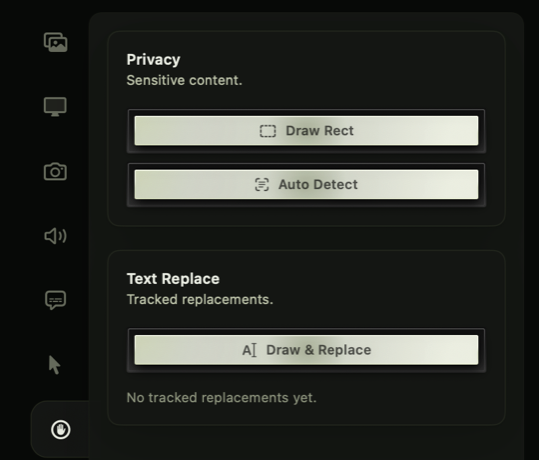
Pick the privacy tool based on the risk.
Draw Rect is fastest for manual masks, Auto Detect helps find credential-like strings, and Draw & Replace keeps the video readable with safer text.
Automatic detection is focused on credential-like strings. It is a safety net, not a substitute for manual review of private product data, customer details, internal URLs, or anything specific to your organization.
Manual Draw Rect
Use Draw Rect when you need to mark something the automatic analyzer should not guess, such as a custom identifier, account page, terminal output, or private dashboard value.
Fraime.it anchors manual masks to detected text where possible, so the mask can follow content as it scrolls or moves.
After drawing a region, scrub through the affected time range. Make sure the mask follows the target while scrolling, resizing, or switching tabs.
Blur or pixelate
Choose blur or pixelate, then tune the mask intensity and bleed. Use enough padding to cover anti-aliased edges and movement between frames.
Blur is usually less visually harsh for product demos. Pixelate is more obvious and can be better when you want reviewers to notice that something was intentionally hidden.
Text replacement
Text replacement is useful when you want the video to remain readable while hiding the real value. Replace a hard-coded string with a safer substitute, then style it to blend with the surrounding UI.
Good replacements preserve the shape of the explanation. For example, replace a real API token with sk_test_..., a customer name with Acme, or a private email with dev@example.com.
Privacy review checklist
Before exporting, check:
- Terminal output and stack traces
- Browser address bars and query strings
- API clients and request headers
- Environment files and config panels
- Customer names, emails, IDs, and billing screens
- Dashboards, database rows, and admin pages
- Clipboard managers, notifications, and menu bar popovers
Export safety
Redactions and text replacements are rendered into the exported file. The original recording remains in the local project package, so treat source projects as sensitive if they contain secrets.
Troubleshooting
If a mask drifts, shorten the affected segment and add another manual redaction. If text replacement looks misaligned, adjust the replacement styling or fall back to blur/pixelate for that section. If you are unsure whether a value is sensitive, redact it.