Capture the full session
Record screen, webcam, system audio, microphone, plus keystrokes and scroll telemetry in a native macOS app built for tutorials, demos, and walkthroughs.
Fraime.it turns a raw screen recording into clear, deliberate developer content with native capture, IDE context, 3D punch camera moves, webcam keying, Shorts formatting, and AI-assisted editing built into one macOS app.
Pro is $8/month billed annually at $99, or $19 month to month.
Built on ScreenCaptureKit, AVFoundation, and Metal for native performance
At a glance
Record screen, webcam, system audio, microphone, plus keystrokes and scroll telemetry in a native macOS app built for tutorials, demos, and walkthroughs.
Stream metadata from VS Code-family editors so the recording carries file paths, cursor positions, and function scope, not just pixels.
Detect API keys and tokens on-device, draw rectangles over anything else sensitive, and have blur or pixelate baked into the final export, never the source recording.
Shorts formatting, webcam keying, 3D punch camera moves, annotations, image and SVG overlays, text replacements, background music, and a keyboard HUD all live in the same timeline.
Capture
Fraime.it gives you the fundamentals: reliable screen capture, webcam, and audio that let you record the real walkthrough instead of stitching together disconnected sources later. Under the hood, the app leans on ScreenCaptureKit, AVFoundation, and a Metal-based compositing path so preview and export stay fast.
Great technical videos need more than capture quality. They need context, pacing, and enough control to guide attention without rebuilding the whole session in a traditional video editor.
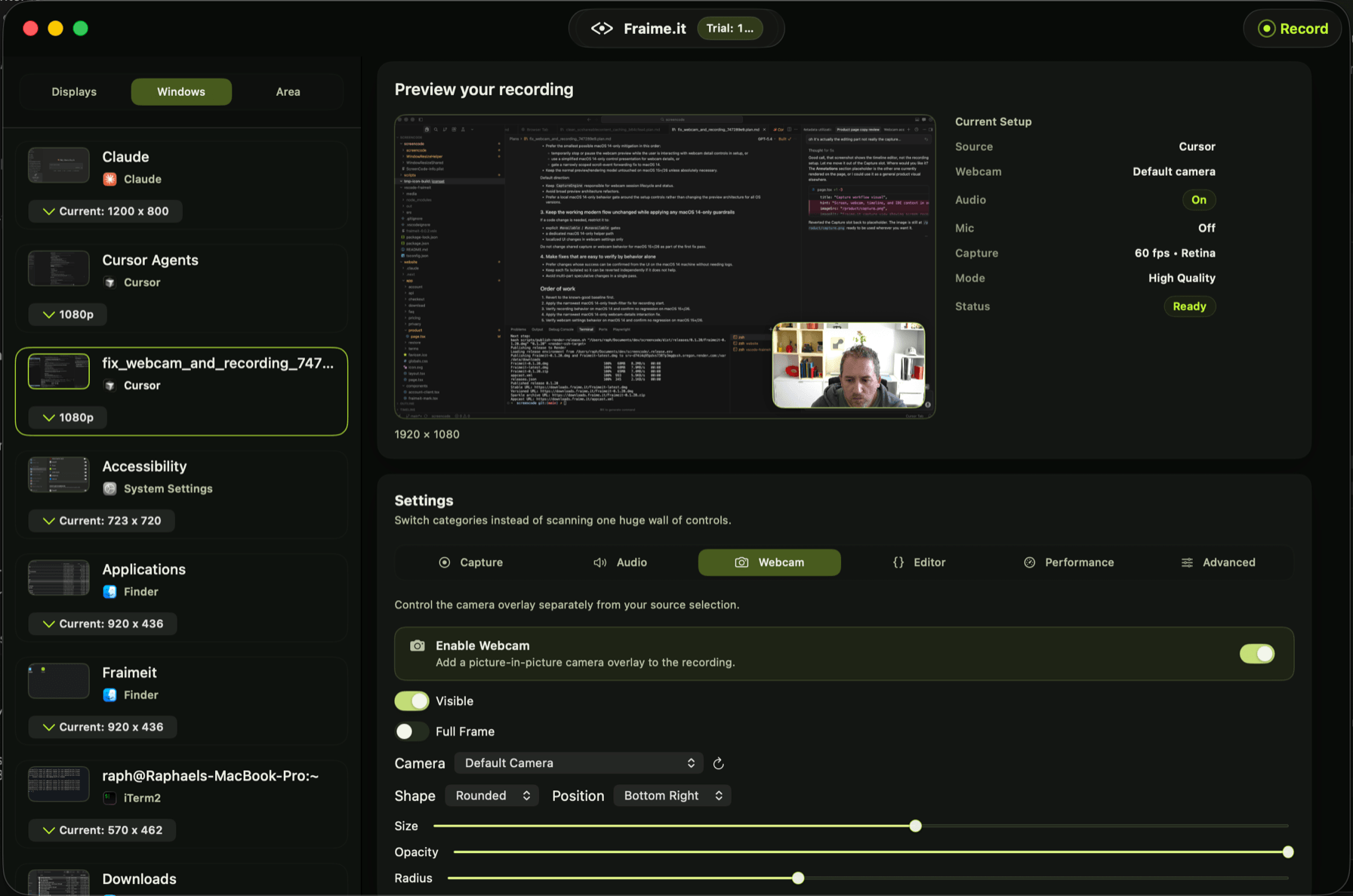
Source selection, live preview, webcam overlay, and recording settings in one view.
Edit and polish
The timeline editor gives you multi-track control over screen, webcam, and audio alongside the IDE context captured during the session. Trim, rearrange, and refine without jumping between separate tools or losing the connection to what happened in the original recording.
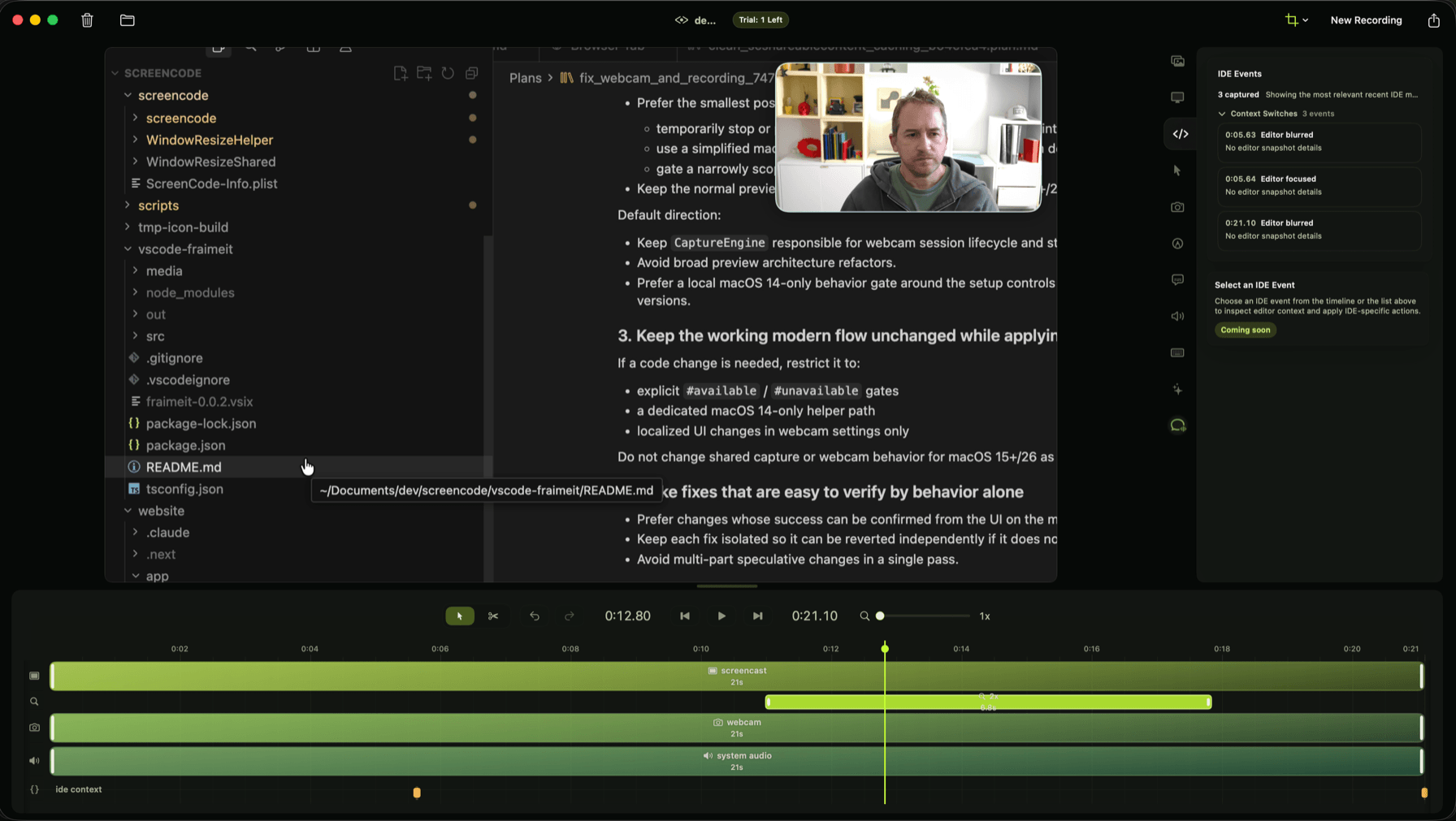
Multi-track timeline with screen, webcam, audio, and IDE context.
Smart Zoom
Smart Zoom is on-device AI reading the activity captured during the session, cursor movement, clicks, IDE selections, and Chrome browser telemetry, to decide where to zoom, how far to push in, and how to frame the shot. Suggested zooms land on the timeline as editable segments, so you keep full control while skipping the manual keyframing.
Shorts and social export
Fraime.it includes a Shorts template for the common short-form workflow: switch the project to a 9:16 canvas, set a 1080 x 1920 MP4 export, tighten the background framing, style subtitles, add an opening hook, and place the webcam where it works for vertical video.
Webcam keying
Webcam polish is part of the timeline, not a separate capture step. Use person segmentation for fast background removal, blur the room behind you, or switch to green-screen keying with color sampling and matte controls when you want more control over the result.
Polish
Technical recordings are easier to follow when emphasis is built in from the start. Fraime.it layers in the presentation touches (3D punch moves, text callouts, subtitles, image and SVG overlays, post-hoc text replacements, background music, and an on-screen keyboard HUD) without sending you off to a separate motion-graphics tool.
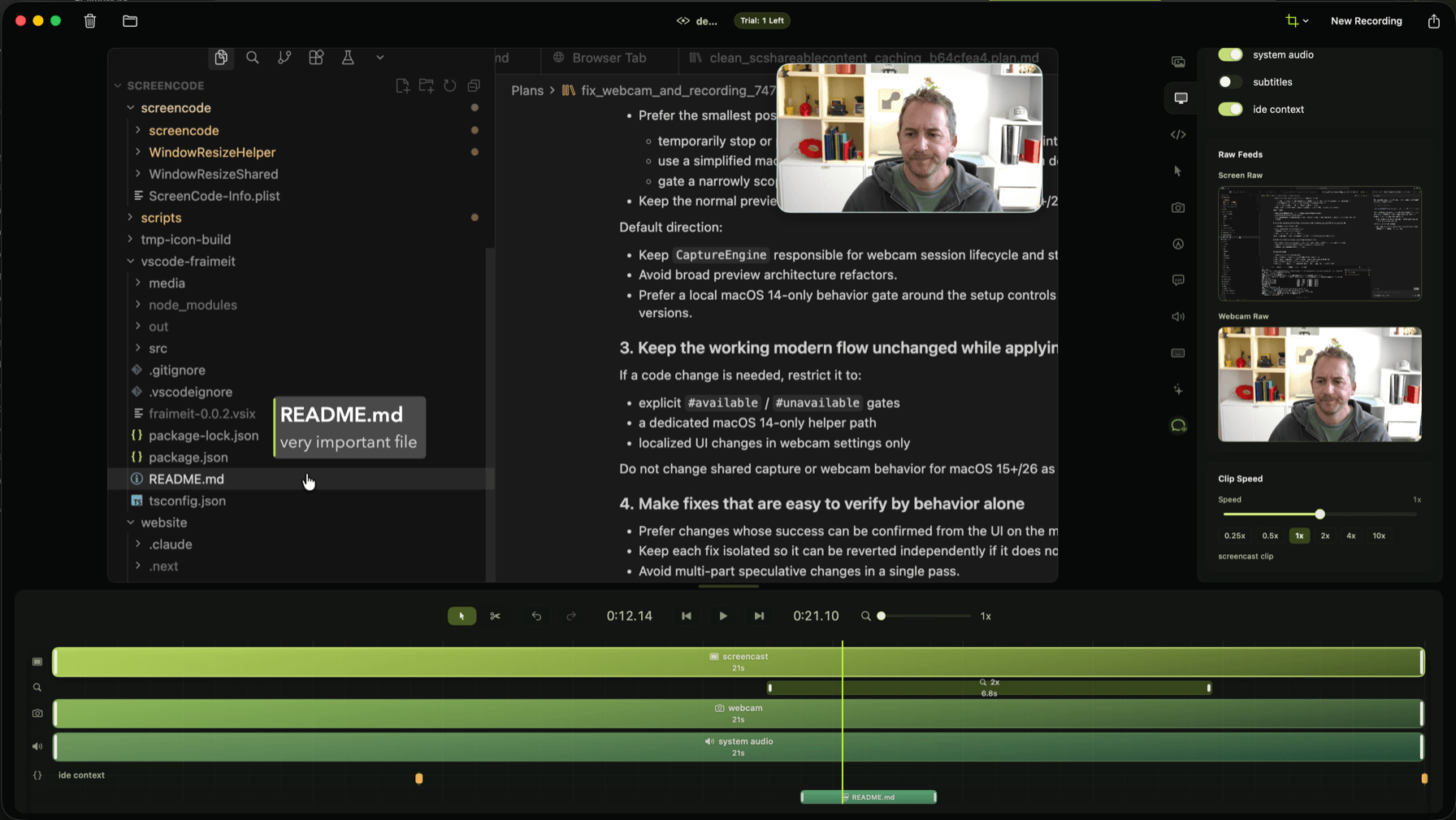
Lower third annotations with customizable text, styling, and timing controls.
Context
Fraime.it pairs with two optional extensions. The editor extension streams context from VS Code-family IDEs, and the Chrome extension streams privacy-aware browser interaction telemetry, both into the local macOS app. Instead of treating the session as a flat video, Fraime.it preserves structured metadata that later edits build on, so Smart Zoom framing, pacing suggestions, and anything an agent proposes stay grounded in what actually happened.
Privacy and redaction
Fraime.it ships with a redaction pipeline built specifically for developer recordings. Run the on-device OCR analyzer and it sweeps the screen track for credentials and sensitive strings, while a manual Draw Rect tool lets you mark anything else and have it tracked across the clip, even as it scrolls. Choose blur or pixelate, see the result live in the preview, and trust that the mask is baked into the exported file rather than overlaid in playback.
AI editing
Fraime.it analyzes your own recording rather than sending it somewhere. Every feature below proposes an edit and waits for you to accept it, so nothing gets quietly rewritten.
Reads the cursor, click, IDE, and browser activity captured during the session to decide where to zoom, how far to push in, and how to frame it. Suggestions land as editable segments. Placing and framing zooms by hand is free.
Finds the silent typing stretches and idle time worth speeding up, and proposes the ramps rather than applying them.
Reads the transcript for the ums and uhs and offers each one as a reviewable cut, so natural speech does not get flattened by accident.
Speech becomes editable, stylable subtitle segments on the timeline. The model file downloads once, then transcription runs on your Mac.
On-device text recognition scans the screen track for API keys, tokens, and sign-in URLs. Findings stay reviewable detections and are never masked automatically.
Describe the change you want and read the proposed edit before it touches anything. Every Mac gets 25 free messages, then it needs Pro. Unlike the rest of this list, Assistant chat is answered by a hosted model.
Transcription, credential detection, smart trim, filler analysis, and Smart Zoom all run locally. Assistant chat is the exception: your request, limited timeline context, and any attached images are sent to Fraime.it’s service to generate the response. Transcription and credential detection are free; everything marked Pro needs a paid plan.
Agents
Fraime.it exposes recording and the timeline to Claude Code, Codex, and Cursor through a local MCP bridge. An agent can capture a session from a plain-language brief, cut the dead air, add chapters, titles, transitions, and subtitles, check the framing from rendered frames, and export. The bridge requires Fraime.it Pro before it accepts a tool call.
From capture to export
Fraime.it is a complete recording-to-export pipeline for developer content. Capture the session, keep the useful metadata, shape the narrative, and export without losing the thread between what you recorded and what you want viewers to see.
Step 1
Start on macOS without a complex setup. Capture the session with screen, webcam, and audio in one place.
Step 2
Save the session as a Fraime.it package with metadata that keeps later edits grounded in what actually happened.
Step 3
Use AI-assisted shaping, annotations, and motion to turn a raw capture into something clean enough to ship.
Capture, edit, and export are free and never watermarked. Upgrade when you want the AI to do the editing.
Pricing detailsDownload Fraime.it, record locally on macOS, and export as much as you want. Capture, context, and polish live in the same native app. Pay only if you want the AI to edit, or an agent to shoot the video.