AI Editing With The Timeline Assistant
Ask for timeline edits in plain language and review every change before it is applied.
The Timeline Assistant is the AI editing panel inside Fraime.it. Describe the change you want, and it proposes an edit you can read before it touches the timeline.
Use it when describing the outcome is faster than performing every timeline operation by hand.
Assistant or agent
Fraime.it has two AI paths, and the docs keep them separate:
- The Assistant is the panel in this app. You type a request, it proposes an edit, you accept or reject it. Nothing to install.
- An agent is an external tool such as Claude Code, Codex, or Cursor, connected over MCP. It can drive recording and editing end to end. See Agent API And MCP Setup.
This page covers the Assistant. Everything here works without connecting an agent.
What the Assistant can do
Open the Assistant tab in the inspector. It sees the current playhead, the current selection, and the project structure, so requests can refer to "here" and "this clip".
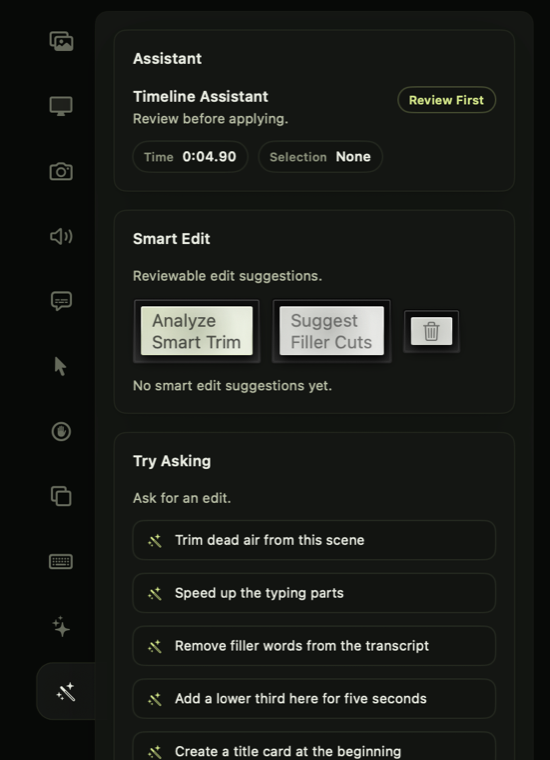
Assistant edits are review-first.
Inspect the current time and selection, ask for common edits, generate smart suggestions, and review proposed changes before applying them.
Good requests include:
- "Create a 30 second launch clip from this project."
- "Add a title card, trim the intro, and suggest where callouts would help."
- "Find filler words and typing-heavy sections I can speed up."
- "Prepare a vertical Short, but show me the change before applying it."
- "Use this attached logo image as an overlay in the intro."
Avoid vague requests like "make it better" when you care about the result. Describe the audience, length, format, and tone.
Smart edit suggestions
Separate from the chat, Fraime.it can analyze the recording and propose specific cuts:
- Filler-word cuts from the transcript, for the ums and uhs.
- Speed-ups for silent typing stretches and idle time.
These are reviewable suggestions, never automatic destructive edits. Judge them like human edits. A filler word can be part of natural speech, and a silent typing stretch may be worth keeping if the viewer needs to watch the code appear.
Filler-word suggestions need a transcript first. See Subtitles And Transcription.
Image attachments
The composer accepts images through the attach button or drag-and-drop. Attached images work as visual context, and can be imported into the project as canvas assets when you ask the Assistant to place one in the video.
Where your data goes
Most of the analysis in Fraime.it runs on your Mac:
- Transcription runs on-device. Model files may download once, when first needed.
- Credential detection runs on-device through macOS text recognition.
- Smart trim and filler-word analysis run on-device.
Assistant chat is the exception. Your request, recent conversation, limited timeline context, and any attached images are sent to Fraime.it's service to generate a response. Do not attach sensitive images or paste secrets into the composer unless you are comfortable with that processing. See the Privacy Policy.
Review before apply
The Assistant reports what would change before it changes anything. Read the summary, then apply only what you want.
Pay particular attention to anything affecting timing, export settings, redactions, subtitles, or large ranges of the timeline.
If a request could reshape the project, duplicate it first. See when to duplicate a project.
What not to delegate
Do not treat the Assistant as your final privacy reviewer. Always check redactions and watch the exported video before publishing.
Troubleshooting
If a proposed edit is broader than you expected, reject it and ask for a smaller one, such as only the title card or only the filler-word cuts. If an applied edit is wrong, undo it. If the project has drifted further than undo can help, return to a duplicate you made earlier.